
Your Joomla Site Needs a Spring Clean Before Summer
Published by SE24Media · May 2026 · 6 min read
Summer is a good time time for Joomla upgrades. Whether you're pushing from Joomla 4 to 5, or finally making the leap to Joomla 6, the single biggest risk isn't the upgrade itself — it's the years of clutter lurking underneath. Here's how to fix that before you touch a version number.
Every Joomla site tells a story of its past. Extensions installed and forgotten. Articles rewritten with their images still sat in /images/. Migration attempts that left database tables orphaned. Theme switches that stranded entire plugin sets. Over months and years, this sediment builds up — and when upgrade time arrives, it's this clutter that causes the headaches.
The good news? With the right tools, a pre-upgrade audit takes hours, not days. And a leaner, cleaner site is faster, safer, and dramatically easier to migrate.
Start with your extensions: the hidden risk in every upgrade
When Joomla releases a new major version, extensions that worked fine on the old version can silently break on the new one. Missing file paths, deprecated hooks, changed APIs — any of these can take down a component you didn't even know was still active. The safest approach is always to go into an upgrade with only the extensions you actually need.
The problem is knowing which ones those are.
A typical Joomla site that's been running for 4+ years has, on average, 20–30% more extensions installed than are actually in active use. Each one is a compatibility risk on upgrade day.
SE AI Extension Cleaner
£39 · Joomla 4, 5 & 6 · PHP 8.1+ · v2.1.0
SE Extension Cleaner runs five intelligent scans across your Joomla installation, each using a weighted scoring system to determine which extensions are genuinely in use, which are dormant, and which have been left behind entirely.
- Detects unused components, modules and plugins instantly
- Finds orphaned database tables from removed extensions
- Identifies broken extensions with missing files on disk
- Optional AI analysis via Claude, OpenAI, DeepSeek or Gemini
- Automatic SQL backups before every destructive action
- Safelist items you've already reviewed
- Export comprehensive PDF and CSV audit reports
- Full action log tracking every change made
Buy SE AI Extension Cleaner — £39 · Documentation
What makes it different from just looking at your extension manager?
The Joomla extension manager shows you what's installed. SE Extension Cleaner tells you what's actually being used. There's a big difference.
A component might be enabled but have no menu items pointing to it, no database content, and no module assignments — a near-zero score that flags it as a clear removal candidate. Contrast that with a component serving active menu items and thousands of rows of data, which scores high and is marked as in use. That nuance is what makes the difference between a confident pre-upgrade cleanup and a nervous one.
The AI analysis layer (new in v2.1.0) adds plain-English explanations alongside any scan result. Connect your preferred provider — Claude, OpenAI, DeepSeek or Gemini — and click Analyse next to any flagged item to get a clear answer: what it is, whether it's safe to remove, and what to watch out for. No data is sent anywhere until you explicitly ask.
Recommended pre-upgrade workflow
- Run a full five-category scan and export the PDF audit report
- Review results — use AI analysis on anything you're unsure about
- Safelist anything that's intentionally unused but should stay
- Disable candidates first — test the site for a few days
- Uninstall confirmed orphans via Joomla's Extension Manager
- Drop orphaned database tables (SQL backup created automatically)
- Run a final scan — then proceed with your Joomla upgrade
Then tackle your images: the silent disk hog
Extension clutter is the visible problem. Image clutter is the quiet one. Every deleted article, every replaced banner, every uninstalled page builder left images behind in your /images/ directory. On a site that's been running for a few years, this can amount to hundreds — sometimes thousands — of files that serve no purpose but take up space and slow your backups.
Before a major upgrade, there's never been a better time to address it. A smaller, cleaner media directory means faster file transfers, faster backup restores if something goes wrong, and less noise when you're reviewing what the new site actually contains.
Disk space isn't the only reason to clean your images. Slow, bloated backups during a Joomla upgrade are a real risk. A backup that takes twice as long is a backup you're twice as likely to interrupt.
SE Image Cleaner
£39 · Joomla 4, 5 & 6 · v1.7.5
SE Image Cleaner cross-references every file in your /images/ directory against every reference in your database — across Joomla core and popular third-party extensions — and surfaces exactly which images aren't used anywhere on your site.
- Smart orphan detection across Joomla and popular extensions
- AJAX scanning with live progress bar — no PHP timeouts on large sites
- Safe two-step deletion with restorable trash folder
- Safelist to protect template or CSS-referenced images
- Core-only or full deep database scan mode
- Image previews, search, sorting and pagination
- One-click restore from trash to original location
- No database tables created — installs and uninstalls cleanly
Buy SE Image Cleaner — £39 · Documentation
It knows about your third-party extensions too
Most image audit tools only check Joomla core content tables. SE Image Cleaner goes further. Out of the box it understands SP Page Builder, K2, EasyBlog, VirtueMart, Kunena, JCE, Akeeba Engage, and many more. When you run a deep scan, it checks every text column in every table in your database — catching image references you might not even know existed.
The result is a reliable, comprehensive list of genuinely unused files, not a blunt sweep that risks deleting things still in use. Images you know are referenced in template files or custom code can be safelisted so they never show up as false positives again.
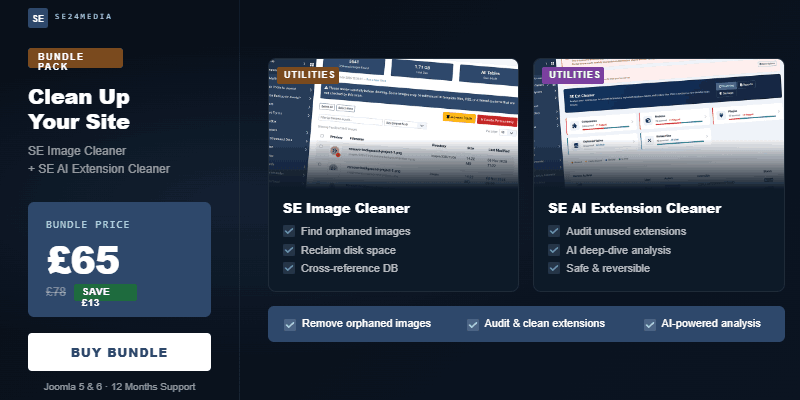
Get both tools for less with the Joomla Cleaner Bundle
The real power of these tools is when you run them in sequence as part of a deliberate pre-upgrade process. Clean up your extensions first — remove the dead weight, close out the orphaned tables, resolve the broken installs. Then run the image audit with a cleaner database state, so the scan reflects your actual live content.
That's exactly what the Joomla Cleaner Bundle is built for.
| Individual | Bundle | |
|---|---|---|
| SE AI Extension Cleaner | £39 | ✓ Included |
| SE Image Cleaner | £39 | ✓ Included |
| Total | £78 | £65 |
| You save | — | £13 |
Both extensions are included with 12 months of support and updates. Developer licences are available as optional extras at checkout for unlimited site activations. You can also add a hands-on clean-up service if you'd rather we do the work for you.
Get the Joomla Cleaner Bundle — £65
Don't leave it until upgrade day
The worst time to discover a problem is mid-upgrade. A broken extension you didn't know was installed becomes an error on the upgrade log. An orphaned database table that conflicts with a new schema becomes a show-stopper. The whole point of a pre-upgrade audit is to surface these issues while you still have time to deal with them calmly.
Summer is traditionally when Joomla site owners find a window for major maintenance. If that's on your plan this year, the Joomla Cleaner Bundle is the sensible place to start — before you touch a template, a version number, or a backup restore button.
Browse the full range of SE24Media extensions for Joomla.