
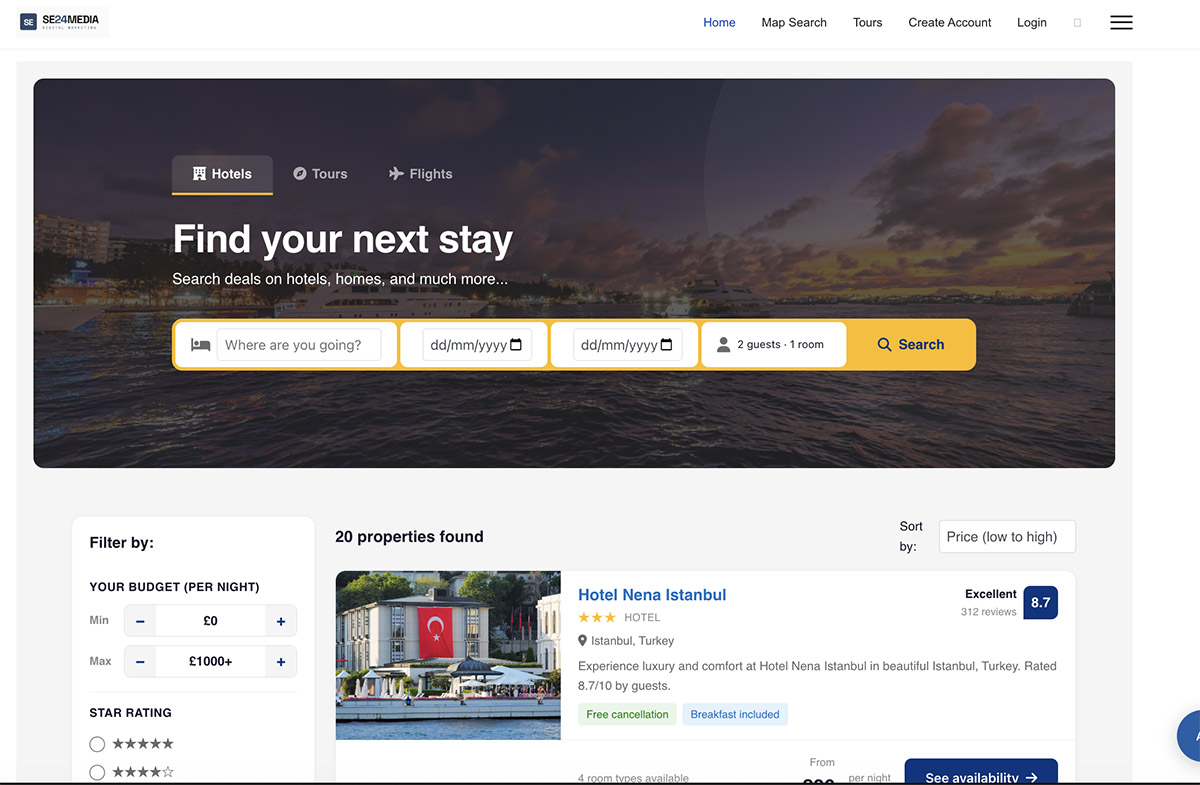
If you have been searching for a Joomla travel booking component that gives you genuine ownership of your bookings, your revenue, and your customer data, SE Travel Booking was built for you.
Launched today, SE Travel Booking is a full-featured, self-hosted booking system for Joomla 6 that handles property listings, tour reservations, multi-vendor marketplaces, online payments, and automated guest communications — all from your own server, with no monthly SaaS fees and no commission taken on your transactions.
Why Choose a Self-Hosted Joomla Travel Booking Component?
Most travel booking software is sold as a hosted service. You pay a monthly subscription, a percentage of every booking, or both. A self-hosted Joomla hotel booking extension changes that equation entirely. Your site. Your data. Your brand. Your revenue.
SE Travel Booking installs directly into Joomla 6 using the standard Extension Manager. From the moment it is live, every booking made on your site goes straight into your database, every payment goes to your payment gateway account, and every guest email comes from your domain.
What SE Travel Booking Includes
Hotel & Property Listings
Create detailed listings for hotels, villas, apartments, guesthouses, and resorts. Each property supports:
- Unlimited photo gallery with automatic image resizing
- Multiple room types with individual pricing, capacity, and availability
- Amenity icons grouped by category (Wi-Fi, Pool, Parking, Breakfast, and more)
- Star ratings and aggregate guest review scores
- Free cancellation and breakfast included badges
- Tourist tax configuration — per night or per person, with a custom label
- Interactive Google Maps pin with address autocomplete
- Full HTML description for rich, SEO-friendly content
Joomla Tour Booking Built In
SE Travel Booking is not just a hotel booking extension. The tours module lets you list guided experiences, day trips, and multi-day itineraries alongside your accommodation. Tour listings include adult and child pricing, maximum group size enforcement, difficulty level, duration, minimum age, and an instant confirmation badge.
The group size limit is enforced at checkout — guests cannot complete a booking that exceeds the maximum. No configuration required.
Real-Time Availability Engine
The availability engine tracks capacity at every level: frontend search, the booking form, and the admin panel. When the last room or tour place is taken for the requested dates, the slot closes immediately. The system uses database-level row locking to handle simultaneous bookings under load, so there is no race condition risk even during peak traffic.
Multi-Vendor Marketplace
Run a marketplace with multiple property owners and tour operators on a single Joomla installation. Vendors register through a dedicated frontend portal, manage their own listings and rooms, and view their recent bookings — all without admin access to your backend. You control:
- Whether vendor registration is open or invite-only
- Whether new vendors require manual approval
- How many properties each vendor can list
- The commission rate at global, vendor, country, and property level
Six Payment Gateways
Accept payments through any of the following gateways — or offer multiple options side by side:
- Stripe — card payments with embedded checkout and webhook confirmation
- PayPal — redirect or advanced embedded card fields
- Mollie — popular across Europe, supports iDEAL, Bancontact, and more
- Razorpay — preferred gateway for India and South Asia
- Authorize.Net — established US gateway
- MercadoPago — leading gateway for Latin America
- Pay at Property — for operators who prefer offline payment at check-in
All gateways include a sandbox/test mode so you can verify the full booking flow before going live. If your payment provider is not listed, you can request we add one at checkout.
Flexible Commission Models
Two commission structures are supported:
Merchant Model — vendors set their own prices and the platform deducts a commission percentage from each booking before paying out the vendor net.
Agency Model — the platform sets the selling price and the vendor receives an agreed net payout, with the platform retaining the margin.
Commission rates apply in a four-tier priority chain: global default → vendor rate → country rate → property override. This gives you precise control over margins without managing rates for every single listing manually.
AI-Powered Booking Assistant
An optional AI chat widget sits on your frontend, available around the clock. Guests can ask which properties are available for their dates, get recommendations based on group size and budget, and be guided directly to the booking form — in natural conversation, without leaving your site.
The chatbot connects to your live inventory, so the answers it gives are always accurate. Configure the model, the welcome message, the brand colour, and the position from your Joomla admin panel.
Flights Search Tab
Add a Flights tab to your hero search bar and let guests search for flights alongside their accommodation. SE Travel Booking integrates with Amadeus and Duffel for live flight data, or TravelPayouts for affiliate-based flight links. All three options are configured from a single settings panel — no code required.
Automated Email Templates
Every key event in the booking lifecycle triggers an email automatically:
- Booking confirmation to the guest
- New booking alert to the admin
- New booking notification to the vendor
- Payment received confirmation
- Payment failed alert
- Cancellation notice
- Post-stay review request
All templates are editable from the Joomla admin panel. Use placeholder variables like {booking_ref}, {guest_name}, {property_name}, and {total_amount} to personalise every message. An email log shows delivery status for every message sent.
Built on Joomla 6 — Properly
SE Travel Booking follows the Joomla 6 namespace-based MVC architecture throughout. Every PHP file carries a GPL licence header, there are no deprecated patterns, no raw superglobal references, and no hard-coded error suppression. It passes Joomla Extensions Directory (JED) validation.
Updates are delivered through the Joomla Update Manager — the same mechanism Joomla uses to update itself. Activate your licence key once, and every future release appears in your Joomla backend ready to install with a single click.
Who Is SE Travel Booking For?
Independent accommodation operators who want to take direct bookings without paying 15–25% commission to Booking.com or Airbnb on every reservation.
Tour and activity operators who need a professional booking page that carries their brand, not a third-party widget they cannot control.
Travel agencies and DMCs who manage multiple vendors and need a single platform to track bookings, commissions, and payouts.
Joomla developers and agencies who build travel sites for clients and need a reliable, maintainable, self-hosted booking engine with a clean codebase.
Frequently Asked Questions
Does SE Travel Booking work with Joomla 6? Yes. SE Travel Booking 3.2 was built specifically for Joomla 6 and uses the Joomla 6 namespace-based MVC architecture. Joomla 4 and 5 compatibility is also supported.
Can I use SE Travel Booking without a multi-vendor setup? Yes. The vendor system is optional. You can run SE Travel Booking as a single-operator site and manage all listings yourself from the Joomla admin panel.
Does SE Travel Booking take a percentage of my bookings? No. SE Travel Booking is a one-time licence purchase. Your payment gateway provider will charge their standard processing fees, but SE Travel Booking takes nothing from your transactions.
Which payment gateways are supported? Stripe, PayPal, Mollie, Razorpay, Authorize.Net, MercadoPago, and Pay at Property. All gateways include a sandbox mode for testing.
Can guests search for flights on my site? Yes. The optional Flights tab integrates with Amadeus, Duffel, or TravelPayouts. You can enable or disable the flights tab independently of hotels and tours.
Is the AI chatbot included in the licence? The chatbot integration is included in the component. You will need your own API key from an AI provider such as OpenAI. The API key is entered in your Joomla admin settings.
How do updates work? Updates are delivered through the Joomla Update Manager. After activating your licence key in the component settings, new versions appear in Joomla's System → Updates panel automatically.
Can I customise the look and feel? Yes. The Theme settings panel lets you configure the hero banner background, overlay colour and opacity, container width, tab labels, and brand colours — all without editing any template files.
Get SE Travel Booking Today
SE Travel Booking is available now. Licences include 12 months of updates delivered automatically through the Joomla Update Manager, plus access to documentation and support.
Purchase SE Travel Booking at se24media.co.uk
Take your first direct booking today — on your site, on your terms.