
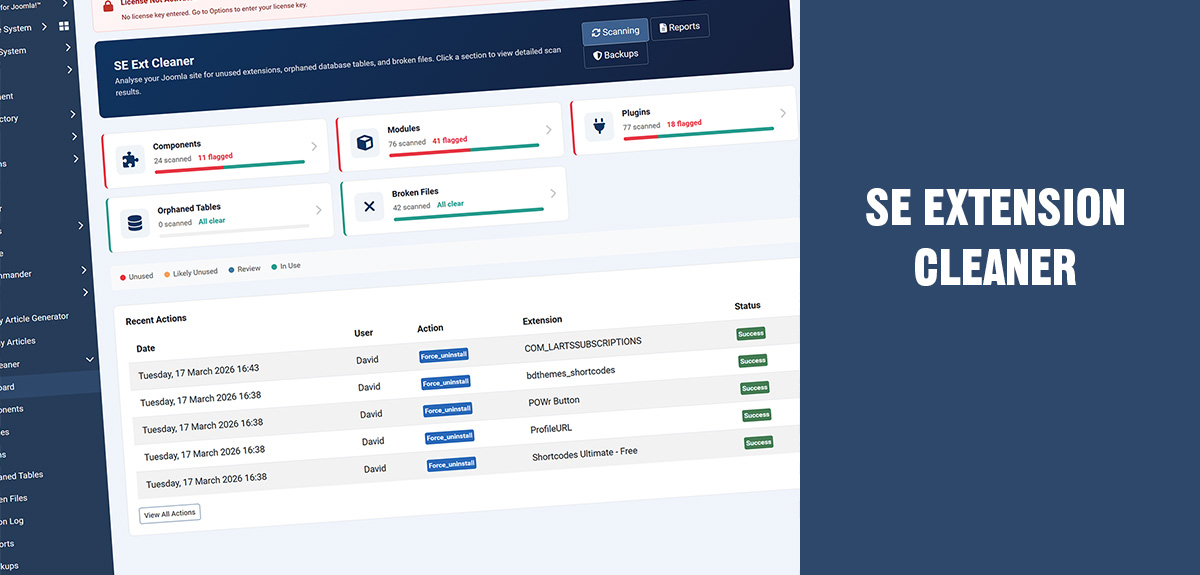
If you've ever upgraded a Joomla site from one major version to another, you know the feeling. You click the update button, hold your breath, and hope that the 47 extensions you installed over the past three years all play nicely with the new version. Sometimes they do. Often, they don't.
The reality is that most Joomla sites carry dead weight — extensions that were installed once and forgotten, database tables left behind by components that were deleted via FTP instead of properly uninstalled, and plugins that belong to extensions you removed two years ago. This clutter doesn't just waste space. It actively makes upgrades riskier, because every orphaned file, every abandoned database table, and every broken extension record is another thing that can go wrong during a migration.
SE Extension Cleaner was built to solve exactly this problem. And with version 2.1.0, it now brings AI analysis into the mix — giving you an expert second opinion on every item it finds.
What actually goes wrong during Joomla upgrades
When you upgrade from Joomla 4 to 5, or from 5 to 6, the upgrade process touches the database, rewrites core files, and expects every installed extension to follow the current architecture. Here's where things typically break down.
Ghost extensions are entries in the #__extensions database table for components, modules, or plugins whose files no longer exist on disk. Maybe someone deleted them manually, or a previous uninstall failed halfway. Joomla's updater sees these entries, tries to process them, and throws errors. On a clean site this never happens. On a site that's been running for five years with dozens of extensions installed and removed, it's almost guaranteed.
Orphaned database tables are tables created by extensions that were later removed without a proper uninstall. They sit in your database doing nothing, but during an upgrade they can cause schema conflicts, slow down database migrations, and make it harder to diagnose real problems because you're wading through noise. We've seen sites with 40 or 50 orphaned tables from extensions like K2, VirtueMart, AcyMailing, and SP Page Builder that were uninstalled years ago but left their tables behind.
Deprecated core extensions are another common issue. Joomla 4 removed com_search, the old two-factor authentication plugins, and several others. Joomla 5 removed the compatibility plugin and the end-of-support quickicon plugins. If your site was originally built on Joomla 3 and upgraded through 4, these deprecated entries are probably still sitting in your database. They show up as broken extensions with missing files, and they can interfere with the upgrade process.
Unused third-party extensions are the most common problem of all. That contact form plugin you tried for a week. The social media module you never configured. The SEO component you replaced with something better. They're all still there — enabled, loaded on every page request, and potentially incompatible with the Joomla version you're upgrading to.
How SE Extension Cleaner finds all of it
The extension runs five targeted scans, each looking at a different category of potential problems.
The component scan checks every third-party component against four criteria: does it have frontend menu items, does it have data in its database tables, is it referenced by any modules, and is it currently enabled. Each criterion contributes to a score out of 100, and the score determines whether the component is classified as Unused, Likely Unused, Review, or In Use. A disabled component with no menu items and empty tables scores near zero — that's a clear candidate for removal before an upgrade.
The module scan looks at every site module and checks whether it's published, whether it's assigned to any pages, whether its position exists in your active template, and whether its parent extension is still installed. That last check catches a surprisingly common problem: you uninstall a component but forget that it had a companion module. The module instance stays in the database, assigned to a template position, doing nothing except potentially causing errors.
The plugin scan evaluates every third-party plugin for enabled state, file integrity, and parent component relationships. It identifies integration plugins that belong to extensions you've already removed — things like a plg_content_hikashop that's still registered even though HikaShop was uninstalled months ago.
The orphaned tables scan compares every table in your database against a map of known extensions. This map covers over 100 popular Joomla extensions — from Akeeba Backup and Admin Tools to Kunena Forum and RSForm Pro. When the scanner finds a table that doesn't match any installed extension, it flags it and tells you who probably created it. It also checks the extension cleaner's own action log, so if you previously removed an extension through this tool, it remembers and can identify the leftover tables.
The broken files scan finds extensions that are registered in the database but have missing or incomplete files on disk. It distinguishes between three severity levels: critical (entire directory missing), warning (manifest or service provider missing), and notice (minor file mismatches that don't affect functionality). For known extensions like SP Page Builder, JCE Editor, and Convert Forms, it provides specific notes explaining that certain file mismatches are expected after a Joomla major version change and can be safely ignored.
What's new in v2.1.0: AI-powered analysis
All of the scanning described above works through deterministic checks — database queries, file system lookups, and pattern matching. It's reliable and fast, but it has limits. It can tell you that a table called xyz_cache_items has 3,000 rows and doesn't match any installed extension. What it can't tell you is that based on the column structure, this looks like a transient cache table from a form builder that was uninstalled, the data is almost certainly stale, and dropping it carries minimal risk.
That's where the AI analysis comes in.
Version 2.1.0 adds an optional AI integration that connects to your choice of four providers: Anthropic Claude, OpenAI, DeepSeek, or Google Gemini. You choose your provider, paste your API key in the component options, and test the connection from the dashboard. Once connected, every item on every scan view gets an Analyse button.
Click it, and the extension sends that item's scan data to the AI with a Joomla-specific prompt. For a component, it sends the element name, the score breakdown, the menu item count, the database row count, and the enabled state. For an orphaned table, it sends the table name, the full column structure including column names, data types, and key information, the row count, and the probable owner. The AI comes back with a plain-English explanation: what the item is, whether the data suggests it's safe to remove, and what to watch out for.
This is particularly valuable in three situations.
Unknown orphaned tables. The curated prefix map covers the most popular extensions, but Joomla's ecosystem is vast. When the scanner flags a table as "Unknown owner", the AI can often identify it from the column names and types alone. A table with columns like id, hash, content, created, and expires is almost certainly a cache table. One with user_id, subscription_id, start_date, and amount is membership data you probably want to think twice about dropping.
Extensions you don't recognise. If your site was built by someone else, or if you inherited a client site, you might not know what half the installed extensions do. The AI can identify most popular Joomla extensions by their element name and explain their purpose, so you can make an informed decision about whether to keep or remove them before upgrading.
Broken file diagnosis. When the scanner flags an extension with missing files, the AI can explain whether this is a genuine problem that needs fixing before an upgrade, or a harmless artefact of Joomla's evolving file structure. It can distinguish between a deprecated core extension that should be force-uninstalled, a third-party extension that needs updating to a Joomla 5-compatible version, and a minor manifest mismatch that can be safely ignored.
AI in the PDF report
The AI doesn't just work in the browser. When you export a PDF Site Audit Report, the AI generates an executive summary for each scan section — a concise paragraph highlighting the most important findings, any patterns it notices (like multiple leftover tables from the same vendor), and a clear recommendation. Any items you've previously analysed individually also have their AI responses included inline in the report.
This makes the PDF report genuinely useful for handoff scenarios. If you're a developer preparing an upgrade for a client, or an agency documenting the state of a site before migration, the AI-enhanced report gives you a professional document that explains the findings in plain language rather than just listing database column names and status codes.
Privacy and cost
A fair question: what data gets sent to the AI? The answer is extension metadata only — element names, table names, column structures, scores, and status flags. No user data, no passwords, no site content. The AI never sees the actual data in your tables, just the schema.
On cost: each analysis uses a few hundred tokens of input and up to 500 tokens of output. At current API pricing, that's a fraction of a cent per item. Responses are cached for seven days, so clicking Analyse on the same item twice doesn't cost anything extra. The section summaries for the PDF report are also cached. A full report export on a site with 50 flagged items might cost a few cents in total.
And if you don't want AI at all, you don't have to use it. The extension works identically without it. When no AI provider is configured, the Analyse buttons appear greyed out and disabled. No data is sent anywhere. Every feature that existed in v2.0.5 works exactly as before.
The safe upgrade workflow
Whether or not you use the AI features, SE Extension Cleaner encourages a deliberate, safe workflow for pre-upgrade cleanup.
Step one: back up everything. Before you touch anything, take a full site backup with Akeeba Backup or your hosting provider's backup tool. SE Extension Cleaner has its own Safe Mode that creates SQL backups before every destructive action, but a full site backup is your ultimate safety net.
Step two: scan. Run a full scan from the dashboard. It takes a few seconds and covers all five categories.
Step three: clean up broken files first. These are the items most likely to cause upgrade failures. Force-uninstall any extensions whose files are completely missing — they're already non-functional and their database entries are just clutter. For extensions flagged as "Needs Attention" or "Manifest Mismatch", check whether an update is available that fixes the issue.
Step four: deal with orphaned tables. Drop empty tables from extensions you know you've removed. For tables with data, use the AI Analyse button if you're unsure what the data is. Be cautious with anything you can't identify — mark it as Safe rather than dropping it if in doubt.
Step five: disable, don't delete. For components and plugins flagged as Unused or Likely Unused, disable them first. Test your site thoroughly. Leave them disabled for a few days. If nothing breaks, uninstall them through Joomla's Extension Manager. The extension deliberately offers "Disable" as the primary action rather than "Uninstall" because disabling is reversible.
Step six: export a report. Generate a PDF report documenting everything you found and everything you did. This is your audit trail. If anything goes wrong during the upgrade, you'll know exactly what the site looked like before you started.
Step seven: upgrade. With the clutter cleared, deprecated extensions removed, and broken file entries cleaned up, your upgrade has far fewer things that can go wrong. The Joomla updater is processing a clean database and a clean file system, not fighting through years of accumulated debris.
Getting started
SE Extension Cleaner requires Joomla 5 or later and PHP 8.1+. Install it through Joomla's Extension Manager, enter your license key in the component options, and run your first scan. The whole process from installation to your first full scan report takes about two minutes.
The AI features require an API key from your chosen provider — Anthropic, OpenAI, DeepSeek, or Google. If you don't have one, the extension works perfectly well without AI. The built-in scanning, scoring, and owner identification cover the vast majority of cleanup scenarios. The AI is there for the edge cases and for the convenience of having everything explained in plain English.
Version 2.1.0 is a free update for all existing license holders or available to new customers.
You can buy it here